
Hybrid work models are no longer “new” – they’re becoming the new standard. In Gallup’s tracking of remote-capable jobs in the U.S., 52% of employees are hybrid, compared with 26% fully remote and 21% fully on-site.
This is why many offices have shifted to (or need to shift to) flexible desk policies rather than fixed seating for everyone. In fact, in CBRE’s 2025 European Office Occupier Sentiment Survey, 61% of companies report unassigned desks as the norm.This is a huge waste of office real estate and resources, which is another reason companies are actively moving toward higher desk-sharing ratios and considering how much office space and workspaces they actually need.
But while hot desking can save space, support flexibility, and lower costs, without a clear policy in place to manage desks, this approach can also lead to desk hoarding, confusion, and daily friction.
Below, we outline why a hot desking structure is important, what a hot desking policy can look like, what it should include, and why it matters in the hybrid workplace.
What is a Hot Desk Policy?
A hot desking policy sets the rules and expectations for using shared desks fairly and consistently. The policy establishes guidelines for employee behavior, company support, and booking processes, designed to maintain predictability, hygiene, privacy, and collaboration.
With employees sharing different spaces throughout the work week, a hot desk policy helps companies maintain a clean, healthy environment, while ensuring each employee has the space and technology they need to be productive.
A standard hot desking policy will cover the following areas:
- Bookings vs drop-ins
- Desk expectations
- Protocols for shared equipment and technology
- Etiquette and noise control
We’ll dive into these and three others we feel are key a bit more below.
Why a Hot Desk Policy Matters in Hybrid Workplaces
As noted in CBRE’s 2024 Office Occupier Benchmark Report, desk sharing is becoming more common, with flexible layouts and shared use increasing as companies adapt to hybrid work.
Moreover, In CBRE’s 2024 Asia Pacific survey, the share of companies with a 1:1 or lower desk ratio dropped from 56% in 2023 to 49% in 2024, and is expected to fall further to 32% in 2026.
Desks are no longer needed for every employee, every day.
Since the office is now a sea of available and flexible workspaces in a hybrid model, having a written hot desk policy is critical to maintaining a dynamic, cost-effective collaboration hub optimized for shifting in-office attendance.
The primary reasons hot desking policies are essential for hybrid environments include:
- Repurposing space for collaboration: Having a written policy outlining rules for specific desks or areas allows a company to repurpose spaces into team huddle areas, quiet focus areas, and other zones.
- Fair flexibility: Having guidelines in place around desks and booking procedures, ensures fairness and prevents office territoriality by providing equal access to the same equipment and workspaces
- Avoid confusion: With written guidelines in place, this helps reduce confusion or conflict, and balance employee flexibility and freedom with company productivity and culture.
- Resolve common hot desking challenges: We’ll dive into some of these below, but a written hot desk policy helps resolve or reduce common hot desking challenges that can negatively impact employee experiences and workforce production.
Common Hot Desking Challenges
A hot desking policy helps companies avoid unproductive employee issues that come from hot desking challenges and a poorly managed desk booking process.
Some common issues include (and how a policy and connected desk booking system solve them):
- Employees resisting change (policies help create a predictable structure)
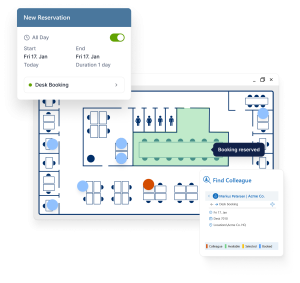
- Team members are struggling to find each other (a booking system helps resolve this issue with coworker workspace searches and bookings)
- Desk hoarding (even when not always there)
- Lack of quiet spaces (no noise or behavior rules)
- Inconsistent enforcement of the rules (having a policy and consequences creates fairness and consistency)
- Poor technology setup (creates friction and conflict)

What a Hot Desk Policy Should Include
A strong hot desking policy has seven core elements.
- Eligibility: Who the policy applies to, and which roles may be excluded
- Booking rules: How desks are reserved, changed, or released
- Desk etiquette: Clean desk expectations, noise levels, and respectful behavior
- Personal items and storage: What can be left behind and where belongings should go
- Confidentiality and privacy: How to handle documents, calls, and privacy in a shared setup
- Equipment and support: What each desk includes and who to contact if something is not working
- Feedback and review: How the policy will be improved over time
| Policy element | What’s included | Practical value |
| Eligibility | Explains who the hot desking policy applies to, and which roles (if any) are excluded from its guidelines | Helps everyone understand who needs to follow what rules in the office |
| Booking rules | Outlines how desks are reserved, how bookings are changed, and how to release/cancel. Will also outline rules for drop-in’s vs scheduling in advance | This helps avoid conflict, frustration, and stress around booking. |
| Desk etiquette | Outlines what a “clean” desk is, how to leave a desk when you’re done with it, hygiene cleaning policies, and what respectful behavior looks like (noise etiquette, phone calls, etc.) | Ensures desks are always clean, safe to use for others, maintained as an office asset, and that employees are able to use resources in a respectful, productive way. This is also critical for supporting a positive, productive work environment. |
| Personal items and storage | Explains if storage is allowed, and if so, what personal items are allowed to be left behind and where. | Helps protect employee privacy and supports important security protocols and desk cleanliness. |
| Confidentiality & Privacy | Sets guidelines for how to handle documents, phone calls, and privacy protocols in a shared set up in accordance with the company’s security policy. | Security breaches can happen at the smallest level, and shared space and desks is an easy avenue to accidentally leave a laptop unlocked or confidential document on display. This set of guidelines help protect employee privacy and company security and confidentiality. |
| Equipment and support | Provides a detailed overview of what each desk should include, and who to contact if something is missing or not functioning properly. | This is important for helping employees understand what technology and resources they will have readily available, need to bring, and whom to reach out to for issue resolution. |
| Feedback and review | Explains how this policy will be reviewed and updated over time, as well as how employees can help with this by providing confidential feedback ongoing. | Helps to maintain a strong policy that works for all employees by evolving it with direct employee input. |
Examples of hot desk policy rules for companies
Here are some helpful examples of hot desking policy rules to consider using or adding to an existing policy.
- Employees must clear the desk at the end of the day (helps maintain health/sanity)
- Desks may only be reserved through the approved booking system (helps avoid booking conflicts and frustrations)
- No personal items may be left behind to “save” a desk (keeps desks clean for everyone)
- Confidential calls should be taken in meeting rooms or private booths (reduces noise and keeps calls and content secure)
- Shared equipment must be left ready for the next user (maintains a positive working environment for all)
- Technical or furniture issues must be reported immediately (helps avoid safety issues and keeps the office running smoothly)
- Repeated no-shows may result in booking restrictions (ensure poor booking etiquette does not cause issues for other employees)
See below for some other example rules to consider including in a hot desking policy based on the hot desk policy core elements:
| Policy area | What to define | Example rule |
| Eligibility | Who uses shared desks | Applies to hybrid staff, excludes reception and facilities roles |
| Booking process | How desks are reserved | Desks must be booked through the approved platform |
| No-shows | What happens if a desk is not used | Bookings may be released after a set period |
| Clean desk | Expectations for leaving the space | Remove all personal items at the end of the day |
| Equipment | Shared tools at each desk | Monitor and keyboard provided at every workstation |
| Privacy | Handling documents and calls | Sensitive calls must be taken in private rooms |
| Storage | Where belongings go | Use lockers for bags and personal items |
| Support | Who handles issues | Report IT or furniture issues through helpdesk |

Best Practices for Rolling Out a Hot Desk Policy
Before implementing your company’s hot desk policy office-wide, here are some best practices to keep in mind.
Doing so will ensure the policy is effective, fair, and ease the transition (if you’re making a lot of changes) with clear communication to everyone once it’s rolled out across the office.
- Understand how teams actually work before setting the rules
- Run a pilot with one team or zone first to identify gaps and areas of weakness or contention
- Involve employees early on for input, feedback, and test runs
- Communicate the policy clearly across channels – email, digital displays, meetings, etc.
- Train managers to apply the rules consistently and provide a system for feedback and concerns
- Review and improve the policy based on feedback and usage data, ongoing – both after testing and once implemented office-wide
Hot Desk Policy Examples by Workplace Type
Examples:
- Small office: Simpler first-come-first-served system with a few reservation rules
- Hybrid corporate office: Desk booking software, neighborhoods, quiet zones, and no-show rules
- Project-based teams: Team zones and recurring bookings for collaboration days
- Privacy-sensitive environments: More meeting rooms, phone booths, and stricter confidentiality guidance
How Desk Booking Tools Can Support and Enforce a Hot Desk Policy
Finally, a hot desk policy and hot desking approach work best when the right technologies are in place to support it (and simplify it). The right hot desking tools make it easier to align with the hot desk policy, meet employees’ needs, maintain balance, and ensure the cost-efficiency of hot desking is still there.
Some tools and features that can support and improve a hot desk policy include:
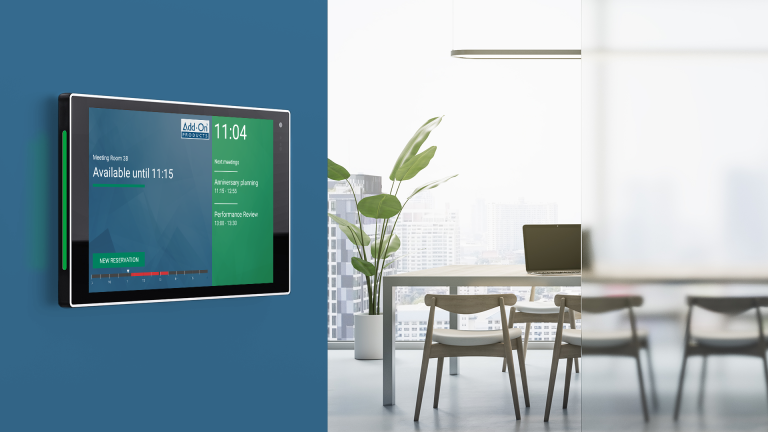
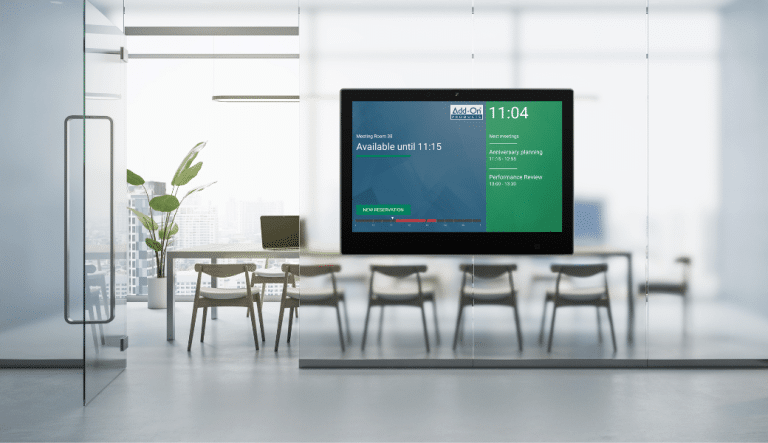
- Real-time desk availability (think visual notifications and markers)
- Interactive floor plans that make it easy to see and find available spaces
- Mobile booking for employees to book from home, in advance, or while on the go
- Recurring reservations to provide consistent teams and employees with a specific space (great for long-term projects)
- No-show rules that are embedded within the desk booking system automatically release desks
- Colleague lookup features to make collaboration easy
- Integrations with workplace tools like Microsoft Outlook® or Teams to keep calendars and communications aligned in real-time

Free online demo
A member of our experienced team is ready to give you a short demo of any one of our products.