


Calendar Management
Software
Get quick, informative overviews of multiple Outlook® and Microsoft 365 calendars in one place with powerful scheduling and planning capabilities to streamline meeting and time management while improving productivity.
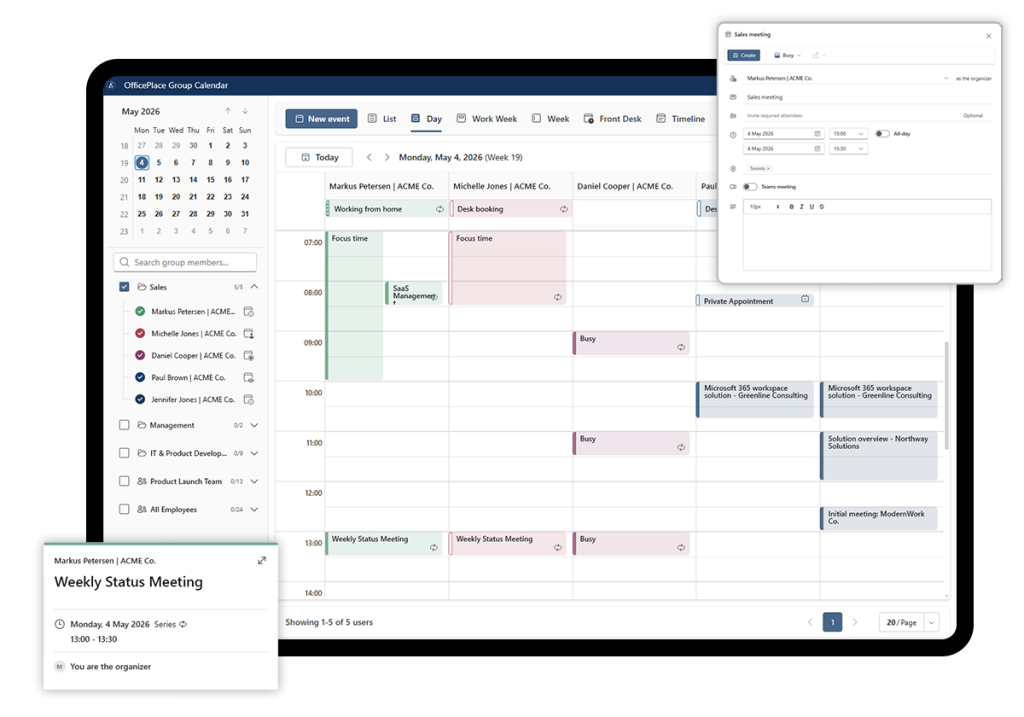







Timesaving calendar management software
OfficePlace Group Calendar is a shared calendar solution for Microsoft Outlook® and Microsoft 365 that provides a single, clear overview of multiple calendars across teams, departments, and locations, making coordination and planning simpler.
Book meetings and appointments directly on multiple calendars with fast, intuitive drag-and-drop functionality. Real-time synchronization keeps all calendar data up to date and prevents double bookings or absences, while full integration with Microsoft Outlook and Teams ensures scheduled events are clearly communicated and confirmed.
With a set of flexible layouts, collaborative features, and a versatile interface, the OfficePlace Group Calendar is a user-friendly tool for anyone looking to streamline their scheduling process and improve their productivity. Once users are added and permissions are in place, you can start using OfficePlace Group Calendar immediately—without complex setup or installation.

A Single Solution for Shared Calendars and Bookings
Support Teams in the Office and Remote
OfficePlace Group Calendar provides quick access to shared calendars and smart planning tools – whether at the office, commuting, or offsite. It gives you the flexibility to book meetings and plan projects with colleagues anytime, anywhere, even while you’re visiting with clients or commuting.
A user-friendly group calendaring solution, OfficePlace Group Calendar combines timesaving features and intuitive views to enhance planning and scheduling, enabling greater flexibility and efficiency across teams.
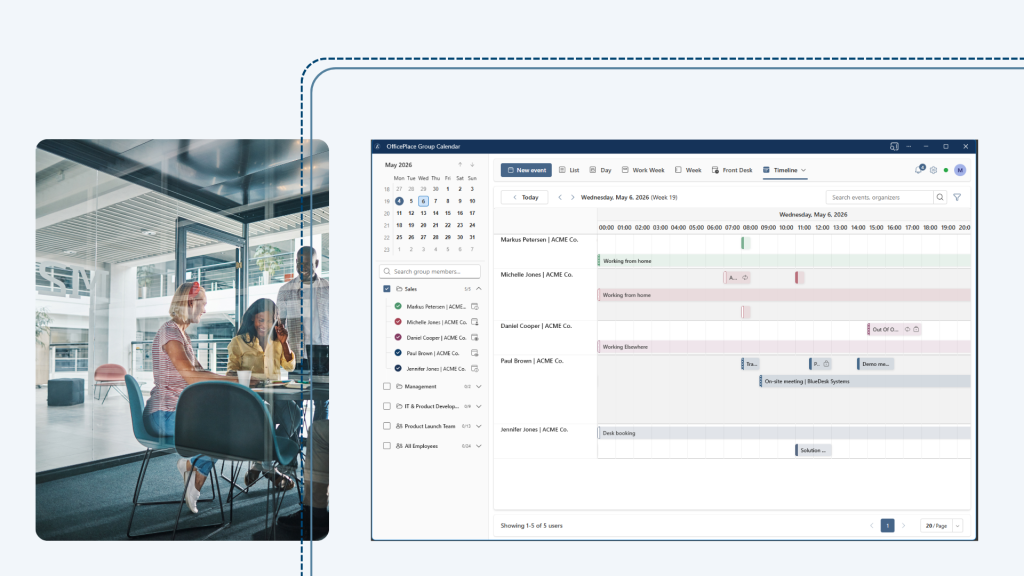
Improve Communications, Collaboration, and Experiences
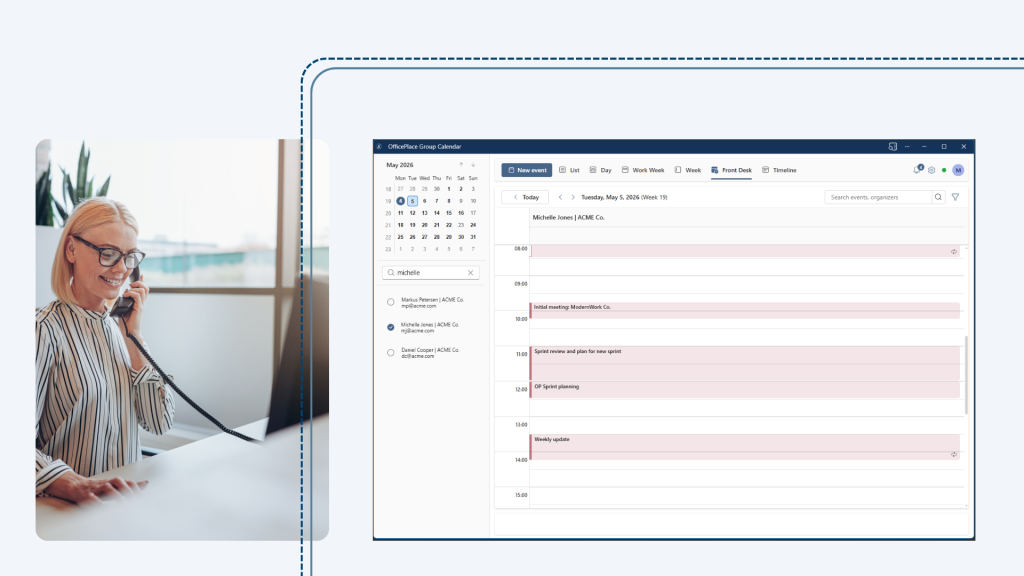
This flexible calendar software improves both internal and external communications and allows for more efficient scheduling within your organization. It can also help you create better visitor experiences with its Front Desk View that helps receptionists quickly pass on information and minimizes wait time.
- Get an overview of multiple calendars and plan meetings when out of the office
- Improve internal communications and time management with important information in one place
- Provide team members with an overview of each other’s calendars
- Built-in planning tools to streamline communication
- Consolidated important meeting and scheduling information in easy-to-navigate views that can be accessed within Microsoft Teams and Outlook®
- Flexible views and layouts let users choose what works for them and focus on the details they need most
Simplify the Planning Process Across Your Operation
Save time and resources when it comes to planning. OfficePlace Group Calendar can help streamline team planning and management, project planning, and operational initiatives – offering different layout options that support daily tasks and planning needs.
For example, a project manager can obtain an overview of his team members’ schedules when booking meetings internally and with clients. He can create a group calendar consisting only of his team members for the duration of a project. Using the drag-and-drop function, he can assign tasks, schedule meetings without sending out meeting requests, and ensure that team members are available for meetings with clients. Sales managers can use the web calendar software to assign customer visits to sales personnel in their department, as well as assign consultants to different projects.

Improve Operational Efficiency and Project Management
OfficePlace Group Calendar can also drive a more efficient approach to operational and project management, delivering actionable insights to advise on how to scope the next project or where to make department changes.
For instance, a project manager can determine how many working hours have been spent on specific projects and tasks. This makes it easy to plan similar projects in the future.
The head of a department may need to print an overview of his staff’s vacation schedule or determine how many working hours were spent on customer support, meetings, customer visits, etc.
With the web calendar software, you can increase your company’s efficiency and expedite smarter project planning.

Three Easy Ways to Get OfficePlace Group Calendar
OfficePlace Group Calendar gives you flexible access to shared calendars in a format that fits your workplace and easily works with existing tools.
OfficePlace Group Calendar can be easily accessed in a web browser or installed as an app using Progressive Web App (PWA) technology for faster access and a more focused, app‑like experience.
For an even more connected experience, OfficePlace Group Calendar is also available as an add‑in for Microsoft Outlook and Microsoft Teams, so the team calendar is always close at hand—driving greater transparency and communication across teams.

Flexible Calendar Views for Different Workstyles
OfficePlace Group Calendar offers multiple calendar views, so users can choose the layout that best fits their daily tasks and planning needs. Additionally, you can create sophisticated filters and group calendars by location, department, or even temporary teams to help focus your views.
See below for some of the views OfficePlace Group Calendar offers:
- List view: Perfect for scanning multiple appointments at once and ideal for users who prefer a structured, overview-based way of working
- Day view: Great for detailed planning and busy schedules, this view provides a clear and focused overview of a single day
- Work week view: This view helps teams focus on what really matters by showing only working days and hiding weekends
- Week view: Useful for planning meetings, availability, and workload ahead of time, this view provides a full overview of the entire week
- Front Desk view: Designed for reception and front desk scenarios, this view offers a clear, real-time overview of shared and resource calendars at a glance
- Timeline view: Ideal for long-term planning and visualizing bookings over time, this view makes it easy to spot conflicts, gaps, and patterns across days, weeks, or months.
With these flexible views, OfficePlace Group Calendar adapts to different roles, tasks, and ways of working—without forcing users into a single layout.

A Calendar Management Solution Built with Microsoft in Mind
OfficePlace Group Calendar is built for the modern Microsoft 365 platform. It easily integrates directly with Microsoft Outlook and Microsoft Teams, bringing shared calendars into the tools your users already work in every day. It can also be accessed as an app or a web-based solution.
- Designed to work seamlessly with Exchange Online and Microsoft Graph
- Authentication is handled through Microsoft Single Sign On (SSO), so users sign in securely with their existing Azure AD accounts
- Cloud-hosted with modern architecture to ensure better security, scalability, and long-term compatibility with Microsoft 365

Feature List
-
User-friendly overviews of team calendars help you see availability, meetings, and workload across multiple colleagues in one view.
-
Plan and schedule meetings faster with multiple colleagues by seeing who is available, without switching between individual calendars.
-
Book meetings directly in accessible colleagues’ calendars without sending meeting requests—no emails, no back and forth.
-
Organize users in flexible groups defined by location, department, role, project, or custom categories
-
Drag and drop actions enable you to quickly move appointments in time or between people
-
Multiple powerful calendar views to choose from: List, Day, Work Week, Week, Front Desk, and Timeline
-
Simplify long-term planning with the Timeline View to visualize bookings across days, weeks, or months and quickly spot conflicts and gaps
-
Create advanced filters for smarter search functionality, including filters based on appointment properties such as status, subject, or type
-
Visible data to help you understand employee and team activity and trends over time
-
Seamless integration with Exchange Online and Microsoft Graph, respecting Outlook permissions.
-
Secure sign-in with Single Sign On (SSO) using existing Microsoft Azure AD user accounts
-
Accessible in a web browser, app, or add-in solution for Microsoft Outlook and Teams
-
No installation needed—access the group calendar from any modern browser.
-
Multi-tenant cloud solution with automatic updates and no infrastructure to maintain
A Cloud-Based Solution to Help You Move Faster
OfficePlace Group Calendar is delivered as a modern, multi-tenant cloud solution, securely hosted on Microsoft Azure. There is nothing to install and no infrastructure to manage—everything runs in the cloud. This makes getting started quick and easy.
Setup is simple, updates happen automatically, and new features are continuously added without disruption to your users.
The shared cloud platform ensures high availability, consistent performance, and ongoing improvements for all customers. With OfficePlace Group Calendar, you can move faster, stay up to date, and reduce both IT effort and operational complexity.

FAQ - Calendar Management Software
What are the benefits of using calendar management software?
Calendar management software can help you streamline your schedule and improve your productivity. The OfficePlace Group Calendar provides a user-friendly overview of multiple Microsoft Outlook calendars as well as powerful scheduling and planning features that improve productivity. Time management becomes easier as you can prioritize tasks and allocate your time more effectively.
If you work with others, the software can help you coordinate schedules more efficiently and avoid scheduling conflicts. You can access OfficePlace Group Calendar from anywhere with an internet connection, thus also making it a relevant tool when working remotely.
What is OfficePlace Group Calendar?
OfficePlace Group Calendar is a modern calendar management solution built for Microsoft 365 and available as a web, app, and add-in solution. OfficePlace Group Calendar gives you a shared overview of multiple user calendars in one place, making it easier to plan, book, and manage meetings across teams. It also supports better visitor management with accurate visibility for front desk teams to critical visitor and meeting information.
Who is OfficePlace Group Calendar for?
OfficePlace Group Calendar is ideal for teams that need to coordinate meetings across many colleagues. It is commonly used by:
- Team leaders and managers
- Administrative staff and coordinators
- Reception and front desk teams
Project teams working across departments or locations
How does OfficePlace Group Calendar work with Microsoft 365?
OfficePlace Group Calendar is a cloud-hosted solution built specifically for Microsoft 365. It works seamlessly with Exchange Online and Microsoft Graph and is hosted on Microsoft Azure.
OfficePlace Group Calendar integrates directly with Microsoft Outlook and Microsoft Teams, bringing shared calendars into the tools employees already work in every day. Calendar permissions are respected, so users only see and manage what they are allowed to. This ensures teams can collaborate quickly and easily while respecting operational restrictions and privacy concerns.
Can I create and manage meetings directly in OfficePlace Group Calendar?
Yes. If you have permission, you can:
- Create meetings directly in colleagues’ calendars
- Move meetings using drag and drop
- Update or delete meetings
- Book meetings without sending traditional meeting requests
All changes are saved directly in Exchange Online, so real-time synchronization across scheduling and communication tools is automated.
Can I manage multiple calendars at the same time?
Yes. OfficePlace Group Calendar makes it much faster than opening calendars one by one in Outlook and lets you:
- View multiple user calendars at once
- Compare availability across teams
- Switch between different calendar views depending on your needs
Can I organize user calendars into groups?
Yes. Groups can be created by selecting only the elements you need. For example, you can define calendar groups based on elements such as:
- Department
- Location
- Team or role
- Temporary or project-based needs
Groups can easily be changed as your organization evolves, making it easy to adjust views over time or as projects change. Just select the items you want included and go from there!
Can you search and filter meetings in the OfficePlace Group Calendar?
Yes. You can use both search and filtering functionality. In OfficePlace Group Calendar, you can:
- Search for meetings by subject, organizer, or calendar
- Create filters based on appointment properties
- Choose to focus only on relevant meetings and time periods
This makes it easier to work with multiple calendars and evolving teams or projects.
What security features are in the OfficePlace Group Calendar?
Security is handled through Microsoft 365. OfficePlace Group Calendar uses Microsoft Azure AD for identity, single sign-on (SSO) for authentication, and leverages existing Outlook and Exchange permissions to ensure appropriate calendaring access and visibility. Moreover, no passwords are ever stored or managed outside Microsoft.
How can we get started with OfficePlace Group Calendar?
It’s easy and fast to start using OfficePlace Group Calendar. As a cloud-based solution, once users are added and permissions are in place, you can start using OfficePlace Group Calendar immediately—without complex setup or installation.
What People Say

“We have a lot of infrastructure, including a lot of meeting infrastructure. And I have to say, now three years after implementation, I think it’s impossible to imagine the organization without Resource Central.”
Annemie Glorieux, Responsible Space Planning
UZ Leuven, Belgium

“From an IT and Digitalization perspective, Add-On Products has been a competent supplier for 10 years. They have provided great input in relation to future development of the solution in accordance with Aarhus Municipality's needs. Most recently they have assisted in an innovative booking project that will make the solution available to a completely new user group.”
Søren Laursen, Chief Consultant
Aarhus Municipality, Denmark

“Our staff are very comfortable using Resource Central to manage their diaries and meetings.”
Ian Scullion, Project Manager
Manchester Primary Care Trust, UK

“The main reason we chose Resource Central is that it supports multiple companies and is easy to use and operate. Having a single solution for all the companies to operate has been a real benefit.”
Svein Arne Hammersland, Manager ICT
Sparebanken Vest, Norway

“The Outlook Web Access capability and reporting and auditing are key features that attracted us to this product.”
Maria Eisenberg, CTO
Calgary Health Region, Canada

“"Our staff was anxious about switching to a new booking system, but they have been very pleased with Resource Central."”
Valerie Weddell, Project Manager/Business Analyst
Multiple Sclerosis Society of Canada

“Ariadne’s features put the product in a class of its own compared to other digital signage solutions.”
Andreas Gemperle, Technical Consultant
Habegger, Switzerland

“In the past it took at least half an hour to organize a meeting; now it takes a few minutes.”
Inge Hansen, IT-Coordinator
University of Southern Denmark

“Thanks to Exchange Central our customers receive better service and we use fewer resources in serving them.”
Jens Erik Rasmussen, Head of IT
TOPNORDIC / ATEA Group, Denmark

“Exchange Central was easy to install and has functioned without any problems ever since.”
Flemming Brink, IT Manager
Municipality of Vejle, Denmark

“We have almost 6,000 employees using Add-On Products’ booking system, though many don’t realize it.”
Tina Lund Bonne, Technology Consultant
Ørsted, Denmark

“Thanks to the implementation of flexible working, Genesis expects to save £1 million year-per-year.”
Jenny Quigley, Project Manager
Genesis Housing Association, UK