
There are a lot of meeting room management systems in the marketplace today.
And with meeting room management trends focused on integrating advanced technologies to support purposeful hybrid work, immersive employee experiences, and operational sustainability and cost-savings goals, now is a good time to outline how to pick the best meeting room management system for your business.
In fact, some industries are considering this for the first time, seeing new opportunities to improve service delivery, guest satisfaction, and operations. Workday recently highlighted this for the hospitality industry: “By 2026, half of all hospitality and travel operators are expected to fully automate key tasks like booking, staff communications, and room optimization.”
Below, we’ve outlined an easy three-step process for choosing the right meeting room management system that you can use.
Three Steps to Choosing the Right Meeting Room Management Platform
The first step to take when picking the best meeting room management solution for your business is to assess your needs.
Step 1 – Assess your workplace needs
- Look at your workplace setup and consider the number of hot desks, conference rooms, meeting rooms, huddle rooms, etc., that need to be managed.
- Consider your existing tech infrastructure (what you are using for calendaring, emailing, and communication).
- Think about your company’s growth plans for the year (or years) ahead and how important it is to have a flexible system that can scale with your organization.
- Outline how different workplaces within the physical office are used or need to be used.
Step 2 – Identify what features and capabilities you need/want
- Consider how rooms and spaces will be used and if employees will need to support extra services like catering, AV equipment, or visitors.
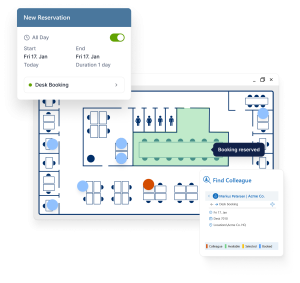
- Identify if you want to have more sophisticated scheduling capabilities, such as recurring meetings, color-coded floor plans, and mobile access.
- Is data important to you? A great meeting room system will provide data and insights on room usage, peak times, and underutilized areas, and help you track trends.
- What automations or customizations are offered?
The above are just a few questions to get you started with evaluating what features you may need. This video offers some other questions you should think about asking when trying to pick the right workplace scheduling and meeting room system.
https://www.youtube.com/watch?v=mpiAL7b-0DI
Step 3 – Filter out your options
You may end up comparing a few different systems in the end. If this happens, we recommend a closer look at some often-overlooked elements. This includes:
- User experience – Is the system easy and intuitive to use? Can employees quickly navigate to what they need and complete bookings?
- User adoption – Is the system easy to learn? Can it be used on desktop and mobile devices for easier bookings on the go (especially key for hybrid and flexible work models)
- Integration – How easy is this system to integrate with your existing calendar and communication tools to make sure bookings are synced up and notifications are sent automatically in real time?
- Scalability – Can the platform grow as your company does or manage multiple global locations? (See how Resource Central did this for a company with locations in six different countries!)
Learn more about the Resource Central meeting room management system here and why organizations around the globe trust it to drive more efficient workflows, improve workplace management, and support sustainability and cost-saving efforts.
Free online demo
A member of our experienced team is ready to give you a short demo of any one of our products.
Request Demo